
Python C2PA Tutorial: Verifying Image Authenticity and Detecting Tampering
In today's digital landscape, AI-generated and manipulated images are becoming increasingly sophisticated and widespread. This raises critical questions about authenticity and trust: How can we verify that an image is genuine and detect if it has been tampered with? One emerging solution is C2PA (Coalition for Content Provenance and Authenticity), an open standard for embedding provenance metadata into images. In this tutorial, we'll explain what C2PA is and why it matters for image verification, show how to use Python to read and verify C2PA metadata, and discuss why metadata alone isn’t enough. We’ll also introduce how detector24.ai combines C2PA verification with AI-based tampering detection for a more robust solution. By the end, beginner Python developers will have a clear roadmap to verify image authenticity and detect manipulation using both metadata and AI tools.
Understanding C2PA: Content Provenance and Why It Matters
C2PA is a technical standard for embedding cryptographically signed metadata (also called content credentials) into digital media. It was developed by a coalition of tech companies and organizations to certify the source and history (provenance) of media content. In simple terms, C2PA allows image creators (or devices and software) to attach information about who made an image, how it was made, and whether it’s been altered, all sealed with a tamper-evident digital signature. Major players like Adobe and OpenAI have adopted C2PA to clearly label AI-generated content. This helps promote transparency about content origins and builds trust in what we see online.
For example, OpenAI now embeds C2PA metadata in images created with DALL·E 3 (such as those generated via ChatGPT) to indicate they were AI-generated. Viewers can use a verification tool (like Adobe’s Content Credentials site) to inspect this metadata, which will reveal details such as the creator (“Issued by OpenAI”), the AI model used (e.g. DALL·E), and the time of creation. Figure 1 below shows a real content credential for an AI-generated image – it clearly states “This image was generated with an AI tool” and lists the OpenAI API and DALL·E as the tools involved, along with a verified timestamp and issuer (OpenAI). This kind of provenance data allows anyone to trace the origin of the image and trust that the information hasn’t been altered.
Figure 1: Example of C2PA content credentials for an AI-generated image (a DALL·E creation). The verified metadata shows it was issued by OpenAI and flags that “This image was generated with an AI tool.” Key details like the app (OpenAI API) and AI model (DALL·E) are recorded, helping users identify AI-generated content.
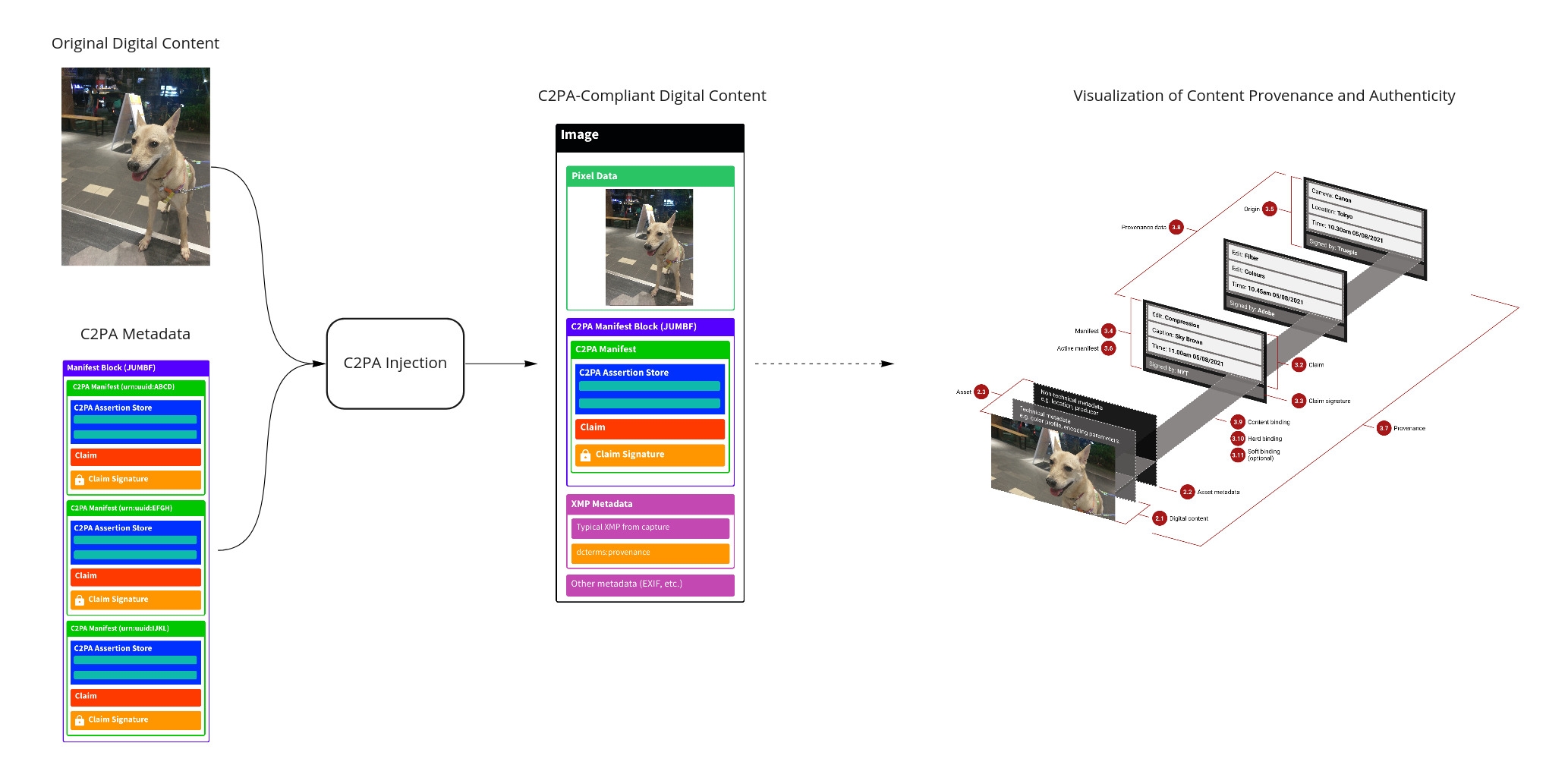
How does this work under the hood? When an image is created in a C2PA-enabled application, a C2PA manifest is embedded into the file. This manifest is essentially a JSON document containing:
- Claims and assertions about the content (e.g. “Generated by OpenAI’s DALL-E”, or “Edited in Photoshop at 10:30 AM 05/08/2021”).
- Provenance data like the creator’s identity, creation time, and any modifications made to the image.
- A cryptographic signature from the issuer to secure the manifest.
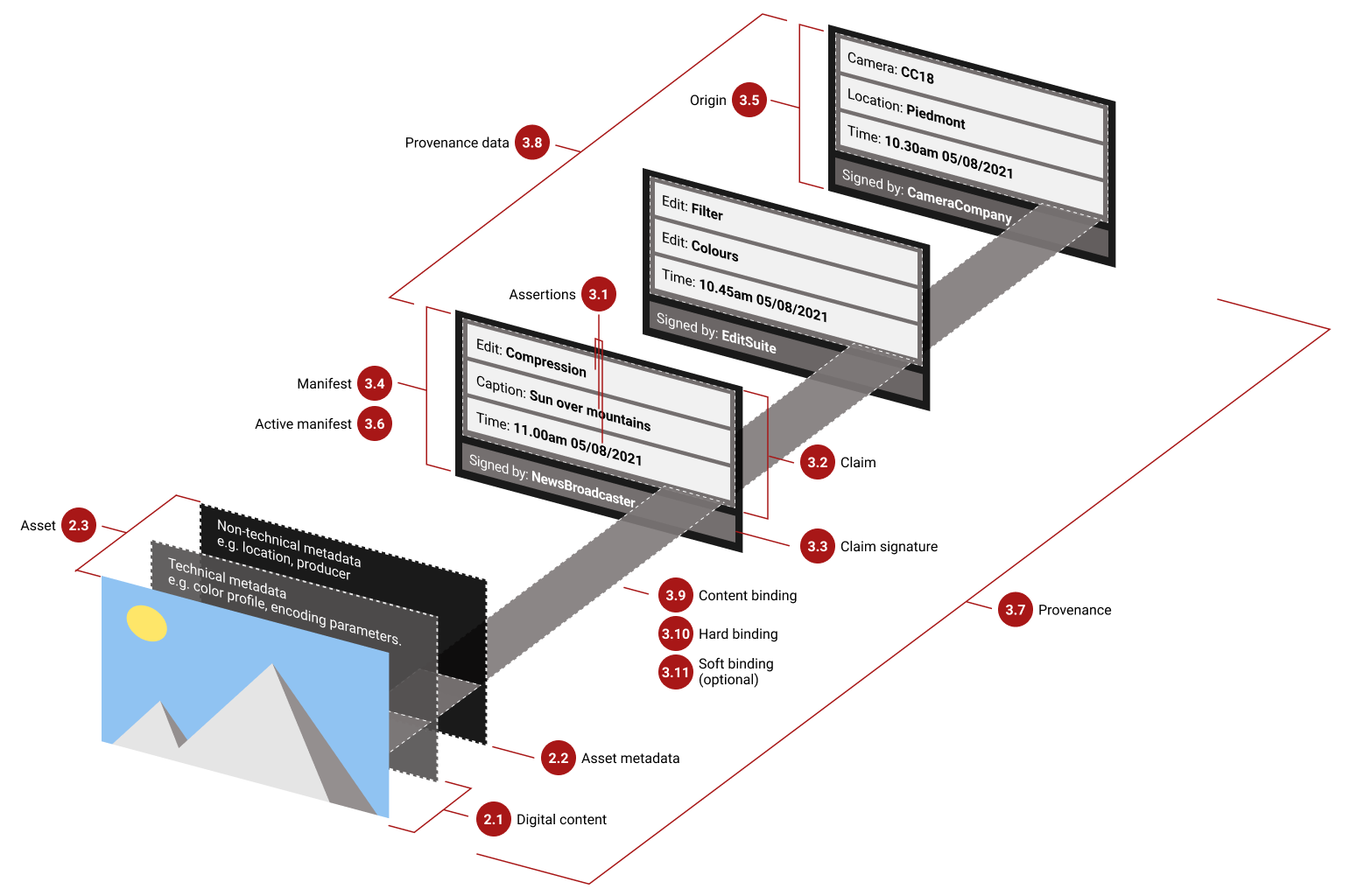
All this information travels with the image as metadata. The manifest can include multiple ingredients or steps if the content was edited or combined from prior assets, forming a chain of provenance. Figure 2 illustrates the concept: the digital content (image) has layers of technical and non-technical metadata, and a manifest with assertions of edits and an origin, each signed by the tool or provider at that step【24†】. The active manifest (the latest one) is what we verify to see the image’s origin and integrity. If someone tries to alter the image or the metadata after the fact, the signature validation will fail, alerting us to tampering.
Figure 2: Conceptual overview of C2PA provenance metadata attaching to an image. The image (asset) is accompanied by asset metadata and a manifest describing its history (edits, origin). Each step (e.g., camera capture, an edit in software) adds an assertion (like an edit description or camera info) and is signed by the respective software or device. The manifest’s digital signature (claim signature) ensures the provenance data cannot be altered unnoticed. If the image is changed after signing, the signature validation will detect it.
In short, C2PA provides a “digital watermark” with verifiable history for an image. It matters because it enables content authenticity at scale: images from cameras, news organizations, and AI generators can carry a provenance trail. As more devices and platforms adopt C2PA, we gain a powerful tool to quickly check if a photo is original or if it’s AI-generated or manipulated, simply by reading its metadata.
C2PA Alone Isn’t Foolproof: How Metadata Can Be Stripped or Altered
While C2PA is a big step forward for authenticating media, it’s not a silver bullet for detecting all fake or tampered images on its own. It’s important to understand the limitations:
- Metadata can be removed: C2PA info lives in the image file’s metadata segments, which can be easily stripped out either accidentally or intentionally. For example, many social media platforms and messaging apps automatically remove metadata (including C2PA) when images are uploaded to save space or for privacy. Even taking a screenshot of an image will result in a new image with no C2PA data. So if you encounter an image with no manifest, it could mean the image is authentic or simply that the metadata was lost in transit. In OpenAI’s words, “an image lacking this metadata may or may not have been generated with ChatGPT…most social media platforms today remove metadata”.
- Not everyone uses C2PA: The effectiveness of C2PA hinges on adoption. If a creator or tool doesn’t embed a content credential, there’s nothing for you to verify. C2PA cannot magically detect a deepfake or AI-generated image if the creator never added credentials in the first place. Today, many AI image generators and image editing tools do not yet support C2PA (or users might deliberately choose to omit it), so plenty of falsified images will simply have no provenance data attached.
- Malicious alteration or forgery: Although the C2PA signature is tamper-evident (any change will invalidate it), a determined attacker could still attempt to alter or replace metadata. For instance, someone could remove an image’s original manifest and attach a fake manifest claiming a different origin. They would not have the proper private keys to sign it as a trusted party, so verification would fail if checked – but casual observers who don’t verify might be fooled by just seeing textual metadata. Moreover, a malicious actor could create a fake image and not declare it as AI (since C2PA is voluntary), or use a tool that lets them embed incorrect info. C2PA “cannot prevent a malicious actor from creating a deepfake without declaring AI involvement... or from stripping existing credentials”. It relies on honest participation for the truthfulness of the metadata.
- Special viewer needed: C2PA info isn’t visible just by looking at the image – you need specific software or an API to read and validate it. Average users might not be aware of how to check an image’s credentials. This means the benefits of C2PA are only realized if viewers make the effort to use verification tools (or if platforms automatically flag images with invalid or missing credentials).
In summary, C2PA provides transparency by design, but it’s not an infallible truth detector. It works best as part of a larger strategy: we should verify C2PA metadata when it’s present, but also have backups for when it’s missing or compromised. That’s where AI-based image forensics come into play – more on that soon. First, let’s get hands-on with reading C2PA data in Python.
Setting Up Your Python Environment for C2PA Verification
Fortunately, you don’t have to build a metadata parser from scratch – the Content Authenticity Initiative provides an official C2PA Python library (bindings to their Rust/C++ implementation) to handle reading and verifying manifests. This library can be installed via pip. Before proceeding, ensure you have Python 3.7+ installed (and preferably a virtual environment for this project). Then run:
pip install -U c2pa-pythonPython
This will install the latest C2PA SDK for Python, which includes the tools to read manifests and check signatures. The library is cross-platform (packaged as a binary extension), so you shouldn’t need additional system dependencies in most cases. If you run into installation issues on an uncommon platform, consult the library’s documentation for build instructions.
Note: The c2pa-python library is actively developed, and its API was revamped around version 0.5.0. The code in this tutorial targets the current version (0.28.0+ as of early 2026). Also, keep in mind this library can read and validate C2PA data and also create/sign manifests if you have the appropriate certificates, but here we'll focus on the reading/verifying part.
Verifying Image Authenticity via C2PA Metadata in Python
Once the library is installed, we can use it to load an image and extract its C2PA manifest (if present). Let’s walk through a basic example. Suppose you have an image file "ai_image.jpg" which was generated by an AI tool that adds C2PA credentials (for instance, an image you created using ChatGPT’s DALL·E integration or Adobe Photoshop with Content Credentials enabled). We will use the C2PA library to check this image’s authenticity:
from c2pa import Reader
import json
# Load the image and extract C2PA manifest (if any)
reader = Reader.from_file("ai_image.jpg")
# Get the manifest store as JSON text and parse it
manifest_json = reader.json()
manifest_store = json.loads(manifest_json)
# Check the overall validation state of the C2PA data
validation_state = reader.get_validation_state()
print("C2PA validation state:", validation_state)
if validation_state is not None and validation_state.lower() == "valid":
# The image has a valid C2PA manifest
active_manifest_id = manifest_store["active_manifest"]
active_manifest = manifest_store["manifests"][active_manifest_id]
issuer = active_manifest.get("signature_info", {}).get("issuer", "Unknown")
print("Image is signed by:", issuer)
else:
print("No valid C2PA manifest found for this image.")
PythonLet’s break down what this code does:
- We create a Reader for the image file. The reader will automatically scan the file for an embedded C2PA manifest. Under the hood, it knows how to handle supported formats (JPEG, PNG, etc.) and locate the content authenticity metadata if it exists.
- We call reader.json() to get the manifest store as a JSON string. The manifest store is essentially the full set of content credentials in the file. We then parse it into a Python dictionary for easy access. This JSON contains all manifests (there can be multiple if the image went through multiple signed steps), with an "active_manifest" key pointing to the latest one.
- We retrieve the validation_state via reader.get_validation_state(). This is a high-level status flag indicating the result of signature verification on the manifest store. Possible values might be "Valid" (signature and integrity check out), "Invalid" or "Corrupted" (the manifest or image has been tampered with and the signature no longer matches), or it could be None if no C2PA data is found at all. In our printout we label it as "C2PA validation state".
- If the validation state indicates a valid manifest, we proceed to fetch the active manifest data. In the manifest JSON, "active_manifest" holds an identifier (a URI/URN) for the latest manifest. We use that to index into the "manifests" map and retrieve the active manifest’s details. From there, we extract the issuer’s name from the signature_info. The issuer is the entity (organization or software) that signed the manifest – in our example, this might be "OpenAI" or "Adobe" etc., which tells us who attests to the content’s authenticity.
- If the validation state was not valid (either None or some error state), we print that no valid manifest was found. This covers cases where the image has no credentials or the credentials fail verification.
When you run this code on a C2PA-enabled image, you should see output that looks like:
C2PA validation state: Valid Image is signed by: OpenAI
This indicates the image’s provenance metadata is intact and passed all verification checks, and that the content was signed by OpenAI (meaning the image was originally generated by an OpenAI tool, in this scenario). In fact, if we inspect the manifest JSON further, we would find details confirming it was generated by DALL·E. For instance, one of the manifest’s assertions might list an action like "c2pa.created" with a software agent named DALL·E, and the issuer in the signature_info is OpenAI. The library’s validation results would show that the claim signature was valid and the content hashes matched, giving us a "Valid" state.
If you try this on an image that lacks C2PA data, the get_validation_state() will return None and our code will simply report no valid manifest found. Similarly, if the image did have a manifest but someone tampered with the image’s pixels or the manifest bytes, the validation would likely fail (the state might be something like "Invalid" or an exception could be raised by the library on reading). In either case, you’d know the content authenticity is not verified.
Example: Detecting Tampering via C2PA Validation
One powerful aspect of C2PA is that it can flag even subtle image tampering when the manifest remains embedded. Because the manifest contains cryptographic hashes of the image data, any change to the pixels will break the signature. To illustrate, imagine we convert our example image to grayscale but somehow keep the original C2PA metadata attached. The content would now differ from what was signed. If we run the verification again on this modified image, the validation_state would no longer be "Valid" – the library would report a failed signature check (the manifest’s hashes wouldn’t match the new pixel data). In a C2PA-aware viewer, you might see an alert that the image has been altered after signing.
In practice, most image editing tools don’t preserve C2PA metadata by default (and editing often recompresses the file, stripping metadata). But advanced use cases or adversaries might attempt to copy the manifest back into an edited image. C2PA’s design accounts for this by ensuring the provenance hashes (like content fingerprints) make such undetected tampering virtually impossible – the validation will catch even a one-pixel change. A demo by the C2PA authors shows that converting just the color profile of an image triggers a validation failure, proving the system’s sensitivity to manipulation.
For a Python developer, the takeaway is: if validation_state comes back as anything other than "Valid", you should treat the image as potentially inauthentic or modified. At that point, you have no trusted provenance from C2PA – you’ll need to rely on other means to judge the image (or find the source for a version with proper credentials).
Beyond Metadata: AI-Powered Tamper Detection with Detector24
As we’ve seen, C2PA is extremely useful when present, but not all images will carry a reliable content credential. This is why combining metadata verification with AI-based detection provides a stronger defense against fake or manipulated images. Detector24.ai is an advanced AI-powered platform that follows this hybrid approach. It integrates C2PA verification into its image analysis pipeline, meaning it checks for authentic content credentials and uses machine learning to scrutinize the pixels for signs of AI generation or editing.
In practical terms, when you submit an image to Detector24’s AI Image Detector, the service will first scan for any C2PA/CAI metadata. If found, it validates the manifest just like we did above. This can immediately tell if the image was tagged as AI-generated by its creator, or if it was supposed to be an original photo with a valid signature (for example, an image with a C2PA claim from a camera or news agency). Detector24’s model takes that into account: a valid manifest from a trusted source might be a strong indicator of authenticity, whereas a manifest indicating AI origin would rightly label the image as AI-generated content. On the other hand, if no metadata is found or the C2PA validation fails, Detector24 doesn’t stop there – it leverages a trained AI model to analyze the image pixels and patterns for telltale signs of tampering or synthetic generation.
Detector24’s AI detection is built on deep learning models that have been trained to recognize artifacts and statistical patterns left behind by generative algorithms and common editing techniques. For instance, AI-generated images might have subtle irregularities in noise patterns, lighting, or fine details (such as overly smooth textures or repetitive elements), and edited images might show inconsistencies in metadata (EXIF anomalies) or slight visual glitches from splicing. The detector looks for these cues. Because it also checks C2PA, it can combine the evidence: if an image claims to be authentic via C2PA but the AI analysis finds it suspicious, that’s a red flag (perhaps someone tried to forge the metadata). Conversely, if the AI analysis is unsure but the image carries a robust valid credential from a known source, you have additional confidence in its authenticity.
In short, using C2PA + AI detection together offers far better protection than either method alone. C2PA gives a cryptographic provenance trail when available (trust but verify), and AI-based detection provides a safety net for cases where metadata is missing or misleading. This layered approach addresses the gap we discussed earlier: a deepfake with no credentials can be caught by the AI model, and an image with credentials can be instantly verified or flagged if those credentials are tampered.
Detector24.ai provides an API and web interface where developers can upload an image and get a comprehensive report on its authenticity. The report will include any C2PA metadata findings (e.g. “Content Credentials found: Issued by Adobe, identified as Edited with Photoshop, Signature valid”) as well as an AI-generated confidence score or labels indicating if the image is likely AI-generated or manipulated. Because Detector24 has C2PA verification built-in, you as a developer don’t need to manually do the steps we did in Python for every image – the service automates it and blends it with the AI’s assessment. This makes it easy to integrate into workflows: for example, an automated content moderation system can use Detector24 to screen user-uploaded images, instantly rejecting ones that are flagged as deepfakes or highlighting those whose provenance doesn’t check out.
Conclusion
Verifying image authenticity is becoming an essential skill in the age of AI-generated media. In this tutorial, we explored how C2PA provides a framework for content provenance, allowing creators to attach tamper-evident metadata to images. We learned how to use Python to extract and verify this metadata, giving us the ability to check if an image is signed and unaltered by its provider. We also discussed the realities that C2PA metadata can be stripped or absent, which means it’s not a standalone solution for tampering detection.
The good news is that we don’t have to rely on one method alone. By combining C2PA verification with AI-based detectors like Detector24, we can cover each other’s blind spots. C2PA shines a light on an image’s origin and edit history when available, and AI analysis can detect suspicious images when no trusted metadata is present. Together, they form a more robust strategy for maintaining digital integrity.
As a Python developer, you can start building these checks into your applications today. Try reading C2PA data from images your organization produces or receives �� see what insights you gain about their provenance. And for broader protection, consider leveraging an AI detection service for an extra layer of defense. By embracing both cryptographic authenticity signals and intelligent content analysis, we can keep our platforms and communities safer from deception. In a world where seeing is no longer always believing, tools like C2PA and Detector24 help us sort the real from the fake – and that’s an ability we all increasingly need.
Key takeaways: C2PA offers a standardized way to trust the source of an image (when the source opts in), and Python makes it straightforward to verify those content credentials. However, always remain aware of the context – lack of C2PA data doesn’t prove anything by itself. For critical use cases, augment metadata checks with AI-driven tamper detection. By doing so, you’ll significantly raise the bar for anyone attempting to pass off fake images as real. Stay curious, keep experimenting with these tools, and contribute to a more trustworthy digital media ecosystem!
Want to learn more?
Explore our other articles and stay up to date with the latest in AI detection and content moderation.
Browse all articles